SMS invites:
how consent works
OutHere (outhereee.com) sends two closely related kinds of text message: a personal hangout invitation, and a find-a-time request for that same hangout. The registered OutHere number texts only people who opted in themselves, on this website, after verifying their phone number. This page documents the consent model, the exact opt-in flow, and the limits our servers enforce.
The consent model
- Consent is given by the person personally, on an OutHere invite or poll page (or when they start a poll on outhereee.com), after proving ownership of the phone number by entering a one-time SMS passcode. Having an OutHere account is never treated as consent.
- The opt-in checkbox is optional and unchecked by default. Declining it never blocks viewing or responding to an invitation, answering a poll, or starting one.
- The campaign's automated texts go only to numbers with a recorded self-opt-in; the server blocks sending to any number without one.
- Each opt-in is recorded with the verified number, the account, a timestamp, the consent wording version, and the invite it was given on; these records are retained as evidence of consent.
- Opt-out always wins: replying STOP, or the turn-off switch the website shows once texts are on, immediately and permanently revokes consent. Replying START, or re-checking the box on the website, opts back in.
- How a person first arrives here: a friend hand-picks them from their own address book and shares a personal invite link. OutHere never messages purchased, scraped, rented, or third-party lists.
- Messages are transactional and event-specific: at most one invitation text per recipient per hangout, at most one find-a-time text per recipient per poll, and never more than one OutHere text every 30 minutes to a number from any one sender, across both kinds. There are no promotional or marketing messages. This is an account notification use case as outlined by the CTIA.
Program disclosures
- Program and brand: OutHere, a product of THEAPPSFACTORY LLC, outhereee.com.
- Messages sent: personal hangout invitations (and find-a-time requests for the same hangout) triggered by a friend, one per event, sent by the registered OutHere number only to recipients with a recorded self-opt-in. No marketing or promotional messages.
- Message frequency varies: at most one text per contact per event, and no more than one text every 30 minutes to a phone number from any one sender.
- Message and data rates may apply.
- Reply STOP at any time to opt out of all OutHere texts; opt-outs are honored automatically and permanently, and a single confirmation message acknowledges the opt-out. Reply START to opt back in.
- Reply HELP for help, or email appfactorybks@gmail.com.
- Carriers are not liable for delayed or undelivered messages.
- complete terms and conditions: outhereee.com/terms · privacy policy: outhereee.com/privacy
The workflow
A host composes a signal (a hangout invitation: what they're doing, where, and when).
In the composer's "pick contacts" section, the host opens their own address book and hand-picks the specific people they want to invite. Nothing is ever auto-selected and there is no "invite all" option. Invite lists are never purchased, scraped, or imported from third-party lists.
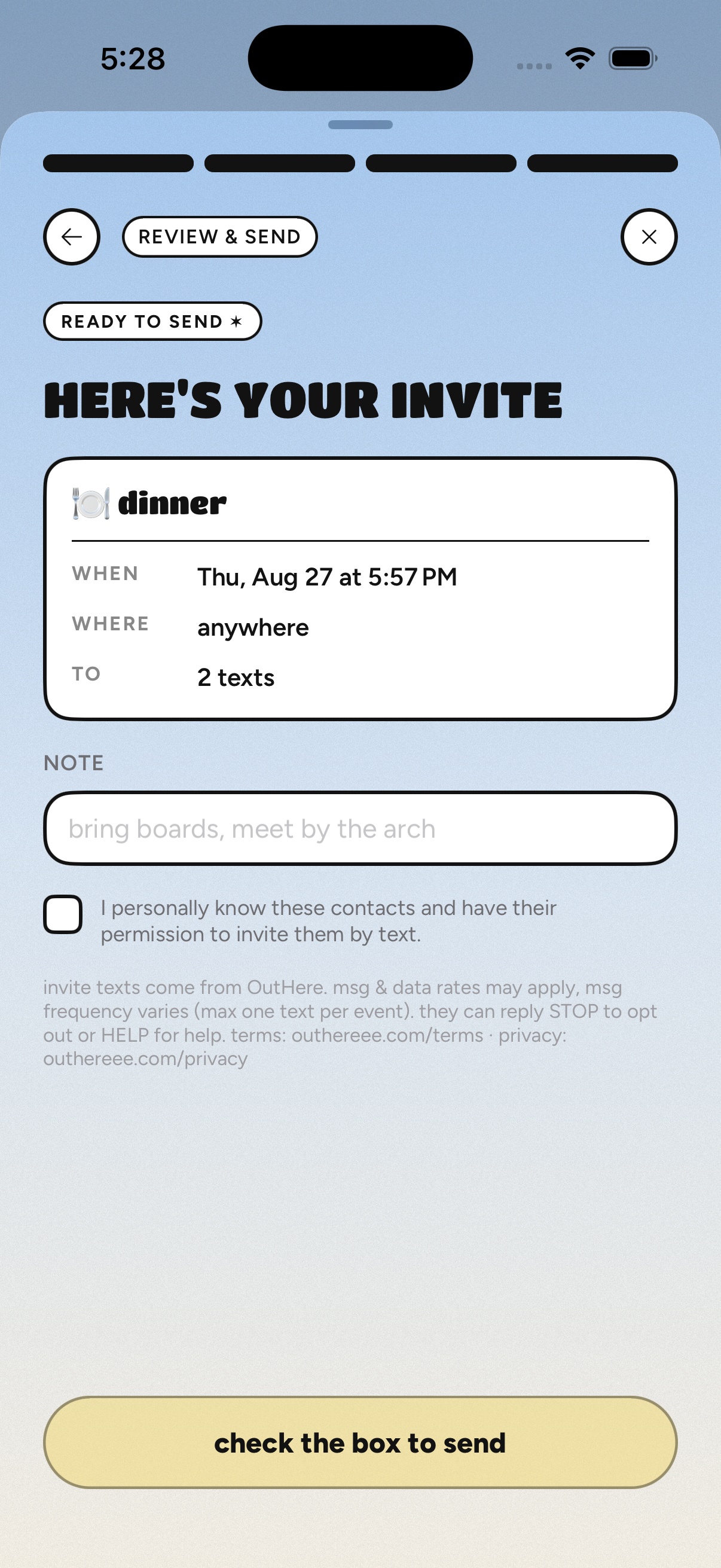
Before any invitation can be sent, the host must check a mandatory attestation confirming they have a direct personal relationship with each selected contact and that contact's permission to be invited by text. The send button stays disabled until the attestation is checked.
The outcome is stated before the host confirms, e.g. "REVIEW INVITE · 2 texts" on the picking step and "TO: 2 texts" on the review screen: contacts who already have the app are notified in-app, and each hand-picked contact without the app receives one SMS invitation.
The recipient's text identifies OutHere and the host, describes the hangout, and carries a personalized RSVP link plus STOP and HELP instructions. The invite page it opens is where the recipient can give their own opt-in for future OutHere texts (the consent point documented above). Replying STOP places the number on a permanent opt-out list that every future send is checked against.
The opt-in path, step by step
The exact path to the consent point, for verification (a live, always-working example is outhereee.com/s/demo):
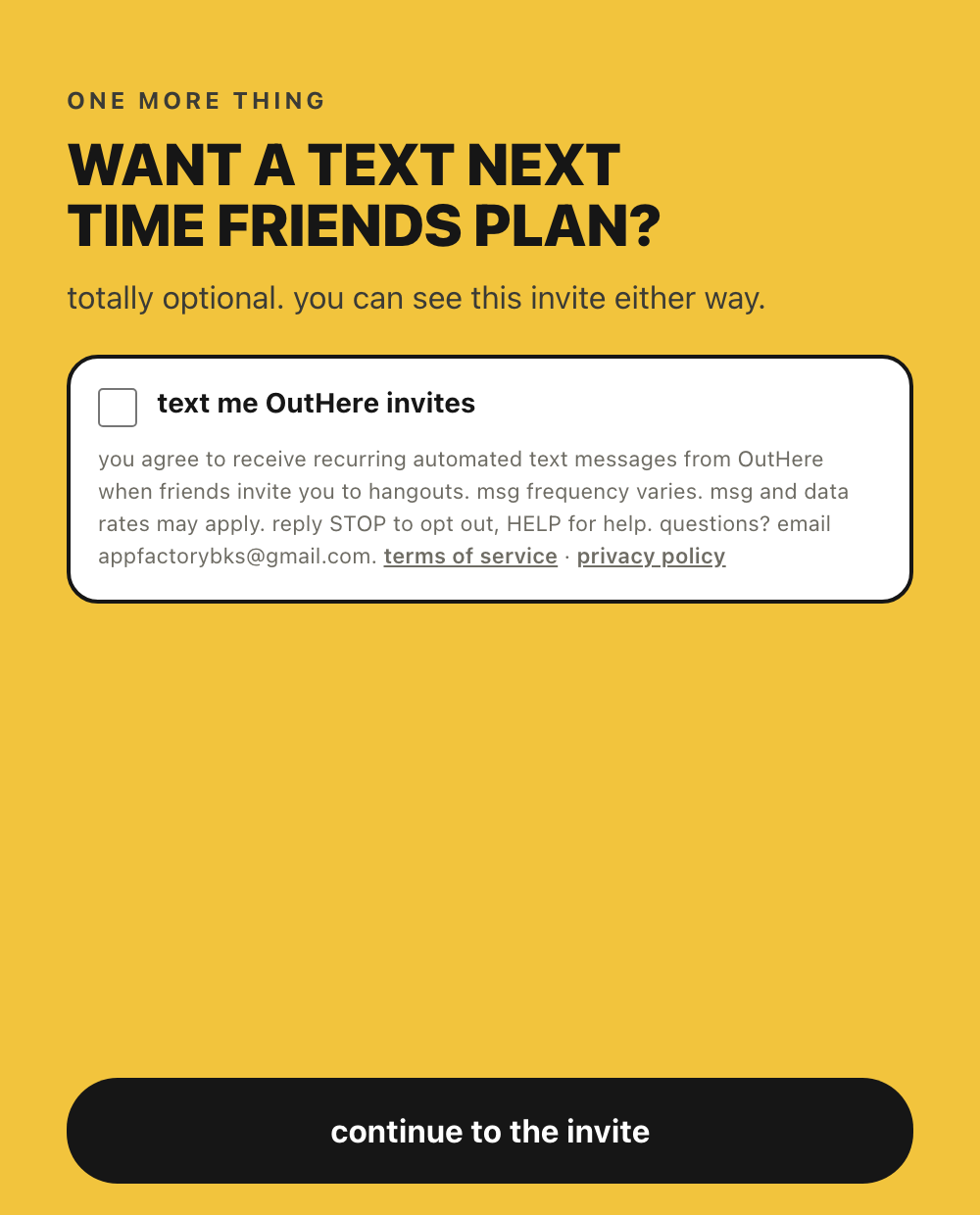
- A person opens an OutHere invite link (outhereee.com/s/... or outhereee.com/p/...) that a friend shared with them personally.
- They enter their phone number, receive a one-time passcode by text, and enter it. The passcode proves they own the number.
- They are then shown a dedicated opt-in page of its own: an optional "text me OutHere invites" checkbox, unchecked by default, with the full disclosure directly beneath it: "you agree to receive recurring automated text messages from OutHere when friends invite you to hangouts. msg frequency varies. msg and data rates may apply. reply STOP to opt out, HELP for help." plus a support email and links to the terms of service and privacy policy. Continuing without checking the box still opens the invite, and the same checkbox stays available on the invite and poll pages afterward. Someone who starts a poll on outhereee.com/polls with a new number sees the same page right after naming their account.
- Checking the box records that recipient's own opt-in: the verified number, the account, the timestamp, the consent wording version, and the invite it was given on.
- The registered OutHere number sends only to numbers with such a recorded self-opt-in; the server blocks every other send.
The consent point, on this website
Context: how the first personal invitation is composed
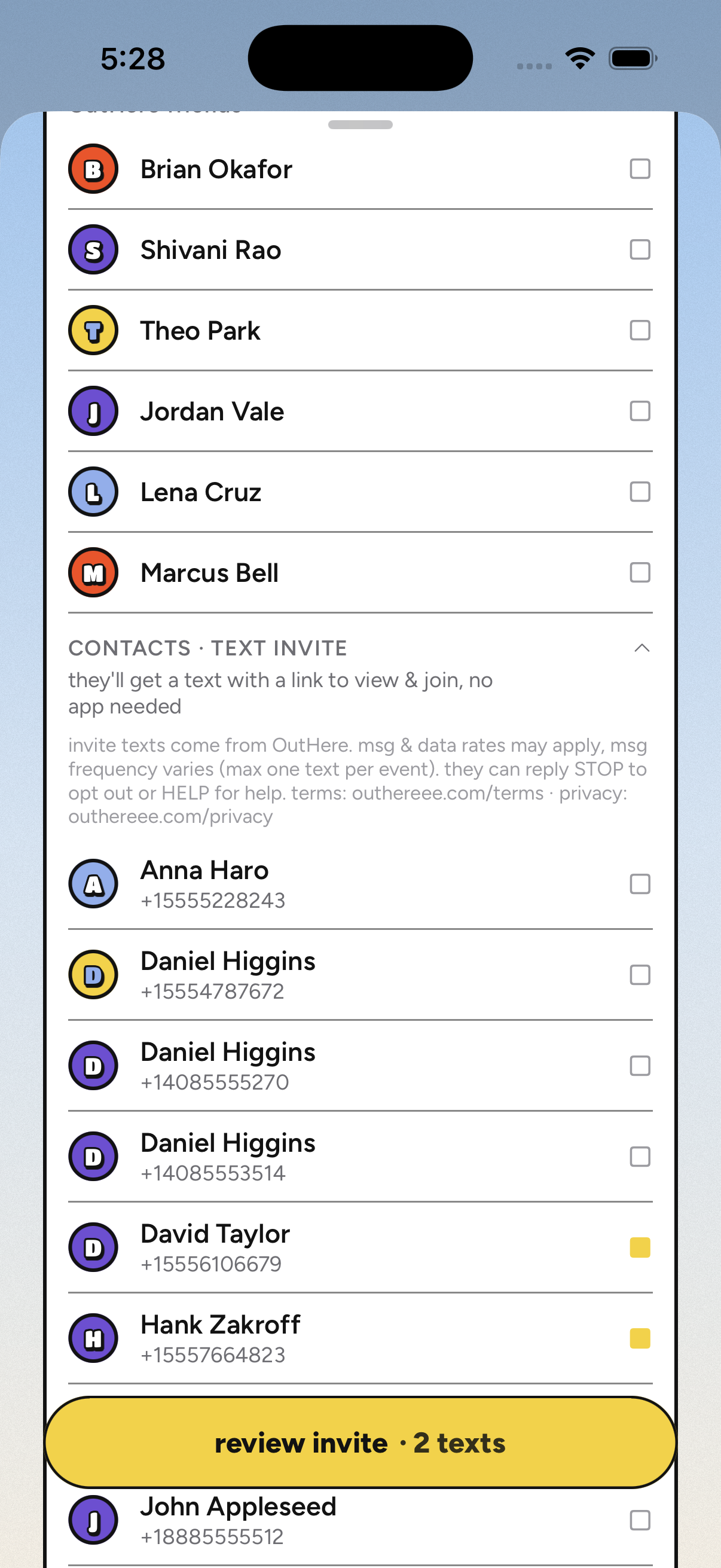
- Contact rows start unchecked; the host actively checks each person (recipients are never pre-selected, and lists are never imported).
- The send step carries a mandatory, unchecked-by-default attestation: "I personally know these contacts and have their permission to invite them by text." Sending is blocked until the host checks it.
- The section is explicitly labeled "CONTACTS · TEXT INVITE", with the fine print directly under the label: "invite texts come from OutHere. msg & data rates may apply, msg frequency varies (max one text per event). they can reply STOP to opt out or HELP for help. terms: outhereee.com/terms · privacy: outhereee.com/privacy".
- Phone numbers come from the host's own address book; recipients are chosen one by one, never bulk-imported, purchased, or scraped.
- The outcome is stated twice before sending: the step button reads "REVIEW INVITE · 2 texts", and the review screen lists "TO: 2 texts" with the fine print repeated above the send button.
The exact messages
and, while a hangout is still being scheduled, the find-a-time variant:
Message frequency varies: at most one text per recipient per event, no more than one text every 30 minutes to a number from any one sender, and only when a friend invites them to something. Message and data rates may apply.
Server-enforced limits
- Numbers without a recorded self-opt-in are never texted by the registered campaign (enforced server-side; such sends are blocked and recorded as skipped, never delivered).
- No invitation is sent until the host checks the attestation confirming a personal relationship with, and permission from, each selected contact.
- One invitation text per contact per event and one find-a-time text per contact per poll, ever (each enforced by a unique database record).
- No more than one OutHere text every 30 minutes to a phone number from any one sender, across both kinds of message.
- At most 50 invite texts per sender per 24 hours.
- Numbers belonging to registered OutHere users are never texted (they get in-app notifications).
- STOP is honored automatically and permanently; START opts back in. Reply HELP or email appfactorybks@gmail.com for help.
- Messages are personal event invitations only. OutHere sends no marketing or promotional messages.
terms of service · SMS terms · privacy policy · appfactorybks@gmail.com